Showing posts with label video. Show all posts

Friday, March 6, 2009

Update on the Ammonia Experiment

After months of hardwork learning the BGE (Blender Game Engine) and the Fluid Simulation , it is very sad to find out that the blender game engine which uses the bullet physics library (currently bullet 2.70) does not have support for particles and fliud simulations . Basically the physics library doesnt know how to calculate the CPU intensive calculations for collisions of softbody and rigid bodies with fluids. So the whole interactive nature of the experiment is on hold till we figure out a way to do it.
now we are continuing with making a video of the experiment atleast.
The following is the way we plan to do it :

Since we have multiple fliud simulations and different events , we decided it would be easier to split the animation into 2 scenes.

1st Scene where we introduce the apparatus and the water in the trough is baked :


2nd Scene where 3 things happen , water in the trough reduces after the injection is pressed following which the water fountain happens.


now both these scenes are separately animated into avi files.
then using the blenders video sequence editor , we plan to complete the animation.


- Gokul

Monday, February 23, 2009

VIDEO SEQUENCE EDITOR

Well you all must have read gokul's mail regarding our doubt in fluid simulation. To quickly bring everyone upto speed - our problem was that we did not know how to bring additional objects into the ongoing animation from a particular(desired) frame.

I was reading to find a solution to our problem and i came across the video sequence editor. It is basically an inbuilt feature in blender which is analogous(if not better) to windows movie maker.
It allows you to split, combine, slow down,etc etc basically anything to do with making a movie.

So i used this feature to solve the "two different coloured ico spheres falling into a container one after the other(basically after desired frames)" problem. The animation is basic and i have not given any subsurf or any textures or tried to work on the lighting. It is solely to illustrate the solution.

The screenshot of the video sequence editor is shown below.
-The top right portion displays the preview
-The top left portion is the ipo curve editor
-The middle portion is the video sequence editor
-The bottom portion displays the timeline
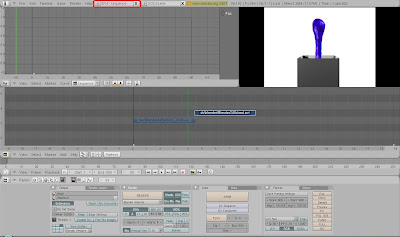


You have to go to the "add" in the video sequence editor portion of the screen to add either an image, or movie, or your baked files. So there is alot of flexibility and alot of options. You can play your file in slow motion by setting the frames/sec field in the "playback" option.

The final output can be in a number of formats as always. The important thing to remember is that in the "render buttons" the "do sequence" option needs to be selected.


The final animation:

Saturday, November 8, 2008

Problems in making a video

while making a video in game engine (the one which i posted last time with cube), cube falling down on a plane...on cube i have put different pictures...
but while making this video i came across few problem some of them i solved like i tried to make make video and i started animating all 250 frames are done and than i saw avi output but it has nothing than i i came to i didnt recorded in IPO and...

another problem cube was falling ion a plane, i gave cube as a dynamic substance and plane as static but when cube was falling down it intersects the plane at some extends and than it stops like this....


i dont knw why this is happening and in avi output the background in dark orange is that is permanant or we can change ? and how?

when we are working on blender simultaneously one dos file is also running, when i was making video i was watching how many frames are done in dos file after few frames i just watched the video in that instead of red colour i got blue and in dos file this message appeared

Detected GL_ARB_texture_env_combine
Detected GL_ARB_texture_cube_map
Enabled GL_ARB_multitexture
Enabled GL_ARB_vertex_program
Detected GL_ARB_depth_texture
Detected GL_EXT_separate_specular_color
shaders not supported!

after every animation it was saying "shaders are not supported !"

than i found it was because of graphic card and graphic cheapset of motherboard it will occur because of those cheapset who doesnt support open GL graphic system....so if any buying new graphic card make sure about open GL system....

and new version of blender is out version 2.48a, in 2.48 there were some bugs in game engine....

so if anyone knows about plane and cube intersecting problem than please inform me...

Nitin Ayer